
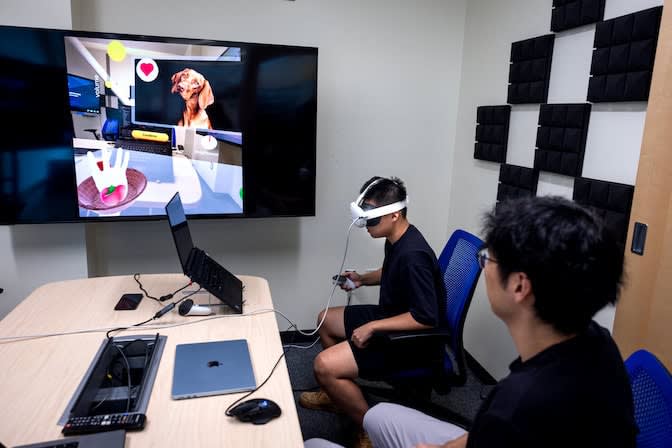
A digital, voice-controlled hand could improve the convenience and accessibility of virtual and augmented reality by enabling hands-free use of games and apps. The prototype software was developed by computer scientists at the University of Michigan.
The researchers’ software, HandProxy, allows VR and AR users to interact with digital spaces by commanding a disembodied hand. Users can ask the hand to grab and move virtual objects, drag and resize windows, and perform gestures, such as a thumbs up. It can even manage complex tasks, such as “clear the table,” without being told every in-between step, thanks to the interpretive power of GPT-4o, the AI model behind ChatGPT.
The hand’s ability to independently parse complex tasks on the fly makes it more flexible than current VR voice-command features, which are limited to simple, system-level tasks, such as opening and scrolling through menus, or predefined commands within an app or game.
“Mobile devices have supported assistive technologies that enable alternative input modes and automated user-interface control, including AI-powered task assistants like Siri. But such capabilities are largely absent in VR and AR hand interactions,” said Anhong Guo, the Morris Wellman Faculty Development Assistant Professor of Computer Science and Engineering.
“HandProxy is our attempt to enable users to fluidly transition between multiple modes of interaction in virtual and augmented reality, including controllers, hand gestures, and speech,” said Corresponding Author Guo.
Here is an exclusive Tech Briefs interview, edited for length and clarity, with Guo.
Tech Briefs: What was the biggest technical challenge you faced while developing HandProxy?
Guo: I think there were two main challenges. One is about how to go from the speech modality to hand control, and how do you decompose it effectively? We kind of established four dimensions: We break down hand interactions into a set of primitives, like gesture control, target control, spatial control, and temporal control. And then we use LLM to carefully decompose it. That's one challenge: What components are needed.
Then the other challenge was that currently interaction with a conversational agent is kind of turn by turn. You ask a question, you wait, you get a response, you see it, and then you keep going — back and forth. But, in this setting, we really need something that's real-time and synchronous and continuous. So, we needed to engineer the system architecture in a way that it does everything in real time in a streaming fashion. Our speech recognition system is a custom one that keeps generating tokens even though the user is still talking, and then we process it and generate intermediate steps. The user can keep talking and the system is able to follow them as it goes.
Tech Briefs: Can you explain in simple terms how it works please?
Guo: The way it works is the user can talk to this virtual hand — what movement or actions they want this hand to perform — as if this is their real hand. This targets applications for people with disabilities, in situational impairments, for example if you are cooking or your hands are busy or in a constrained setting. We provide this alternative modality of using speech.
The way it works is the user speaks virtual commands to tell the hand what to do, what actions to take, what movements, the speed, etc. Then the system decomposes it into a set of primitives, which generates the corresponding gestures that the user is commanding. Then the hand uses these gestures to control the environment.
Tech Briefs: Do you have any set plans or further research work, et cetera, besides what you just described?
Guo: We are very interested in continuing this work. For example, actually building it as part of an operating system layer, what we call the accessibility API. Also, extending beyond a single hand. This one is operating a single hand, but we could extend toward two hands — or even, you are using one hand, and the speech is controlling another hand to collaborate with you. There are interesting challenges there, too.
Transcript
00:00:00
>>Text on Screen: HandProxy is an Al-powered digital
hand that can be controlled by a user's voice. It is designed for AR and VR platforms to allow users to navigate apps and interfaces hands free. Users can ask the hand to perform a variety of tasks.
>>Chen: Pick up the apple.- Uh, Put it into the basket. Press the minimize button. Maximize the window.
>>Text on Screen: HandProxy lets the user know when it recognizes a task and when a task is active.
>>Voice Off-Screen: Grab the peach.
>>:Text on Screen: As well as notifying users of errors with their prompts.
00:00:53 Pick up the watermelon. The first one.
>>Text on Screen:HandProxy offers an accessible form of control to users witn motor impairments.
>>Researcher: Press the minimize button.
>>Text on Screen:The tool also gives users a way to interact
withAR/VR platforms while performing other daily tasks. Maximize the window. Minimize the brightness. Wait.
Actually. Maximize the brightness. Press the confirm button.
00:26:05 Pinch the resize button. More. Right. Stop. Again is flexible to a more broad applications. Beyond just fruits and dogs and buttons. Yeah. So. What is it running on? It's like I noticed the hand. It picked up the cube. I had to keep it up.
00:26:49 And you told it to pick up the peach. It's smart enough to know, I was smart enough to know. We'll have to drop the cube to pick up the peach. Now, how do you do that? Okay, so so the background, the brain of it is actually powered by the large language model. So we keep a history of what the user have been doing. What's the what the environment is about. And this model will be like dynamically inferencing what I do next.
00:27:19 So for example, if I already have something in my hand and I want to grab something else that I need to replace it first. Otherwise I will grab two of them all together. And also the system. Also keep a history like, let's say if I say, click the confirm button. And after that, if I say click it, to it and repeated three times, it can still understand. Okay.
00:27:45 Actually click the confirm button three times because it keeps a history of what the user has been doing. So yeah, the long story short, A it is aware of the user's past interaction and the current environment. Yes. Tell me, what do you see this as a range of applications for this kind of thing. Because I can see like a lot of options. But yeah, lot is wild and bold as you want to do what is has the potential applications.
00:28:14 Yeah. So right now we, we basically made this you know environment. But imagine that if let's say Apple or they have this kind of functionality beauty, then you can use this virtual hand plus our system as a proxy to interact with other applications or, you know, games. For example, let's say, I have my vision profile and I'm doing all these gestures to control the, the device, and then I start to cook. My hands are occupied. Now I can just say, okay, I can delegate the control of this virtual
00:28:53 hand to the system instead of me trying to use my hand to do it. And then I can start talking to the, you know, the device. To control the hand. Well, I'm busy doing something else, like cutting the fruit or whatever. And when I'm ready, when my hands are not, occupied anymore, I can say, okay, give me back. Okay. Give me the control back to me, and then I can use this, hand to do, the things just like before. So with this proxy design,
00:29:23 with don't really require a lot of changes to individual apps, because from the applications perspective, all they can see is that, okay, there's still a hand interacting in this environment. They don't know that, this hand is specially controlled by, another program or whatever, you know, which means it's more compatible with a wider range of, you know, applications that are already running on the, you know, these devices. Yes. Now, ideas like Beyond Cooking. Can I be able to use your hands? From.
00:29:59 Yeah. So it's mostly design for okay. So two things. First is for situation where the hands are not available. So there are situations of empowerment just like what we mentioned. The hands are temporarily occupied or if there are environment constraints, let's say, you know, very small space. I can just do whatever gesture I want or in some cases where I can still, if the user are still able to talk to the device
00:30:29 and cannot do this, gestures due to, you know, impairments or other preferences, they can use this system. And another thing that because this hand can be controlled by the program, it can act as the agent to automate things for you. So you don't have to do a sequence of long interactions to reach a goal. You can just allow yourself, let let the, you know, the, software tool, you know, just give it a high level command and then I will do all this, like, detailed control for you. So, for example, let's say,
00:31:08 one use case of, AR glasses, is that, for productivity, use cases, you will have a lot of windows. For example, you have word over here, brother. Over here. You can just say, okay, organize, my workspace, and then I can it can interpret it. Okay. You have all these windows, all, put over here, but they have space over here. They can just drag all the windows to the appropriate places or in a game, settings.
00:31:39 You have mess with a messy desk. You can just say, okay, clean the data, clean the table, and then I will just do this thing for you. So this is shorter and easier than you know. I grab the watermelon, put it here, I will put it there or something like that. Yeah. Can you compare?
00:32:02 Like the smartness of this program? Like it knows all the steps that come with clean the table. You don't have to tell them. Like how does it compared to voice commands that currently exist with VR. Current speech controls are more for standardized system controls. For example, you can tell the headset, okay, increase the volume, power up a power power of, or select the button, click the button or something like that.
00:32:38 It's more like a basic interactions. And these are all, mostly limited to, system level, meaning you can use that to, you know, operate with, windows with the system settings. But if you have another app that have very own interface or object, you can not really interact with them because it doesn't support this kind of, direct, speech control. So that's why, instead of doing that, we will have this virtual hand that of, that act as a proxy to basically bridge this barrier,
00:33:17 where you can still interact with the device used in speech, but the hand, the virtual hand will be able to then, do interactions on your behalf with all different kind of, you know, applications. This is true to that. Like the current voice commands are like really rigid. So like you have to specifically say, turn the volume up. And if you don't exactly match right command, it won't work. Yeah. Current built in system.
00:33:47 Yes. For example, we're in pro. They have a, if we have a, you know, we're in pro the first thing when we open up the speech control, it's a window that tells you. Okay, here are a list of command you can see. And they give you exactly the format. Okay. You have to say, press but the name press button ID or something like that. So yeah, in that case you have to follow that radio command. But here, as I just demonstrated, it's pretty flexible.
00:34:19 You can say pick up the cube. You can say grab the cube or give me the cube or whatever, or you can give me the read through and you can still know, oh, there's the apple. Then I will grab the apple. So it does have this kind of, you know, inference capability. Yeah. I'm a question for you. Can you use this technology to control physical environment, like a robot arm doing whatever you want to do, or is it or is there a the technology exists allows you to do that? Yeah, there are definitely, overlap with robot control.
00:34:51 One thing that's a little bit tricky is that robot usually, requires more precise, interaction and hand control than in virtual reality. So, for example, let's say, in games, if, let's say I grab something, yes, there are physics that you can, that, detects collision and stuff, but it's not that complete physics. It's not because, okay, the friction of my finger and the, you know, the side of the apple holds the apple or something like that.
00:35:28 So in that case, it will require more, you know, detailed design of the actuation part. But the back before that, the inference part is still there are still some similarity if I know how to control and if I know the information, this can definitely be used like in those like robot control settings as well. Yeah. Awesome. I'm good to, to try and keep talking with do you know, I'm just going to ask like, can you show us an example of, like a simple command doing something
00:36:04 that like required to infer a lot of fun between steps, like ask it to clean the table or something? I think, I think one thing is, let me see, in this environment, because it's actually not that complicated. Complicated? That one thing I'm not sure, if I, I think I demonstrated is that when I say increase the brightness, it knows that it needs to twist the knob.
00:36:36 It needs to grab the knob, twist it to the right instead of twist it to the left and then twist to the maximum and then release. So this is, a little bit more complex than just saying, okay, I need to grab this knob over here. Rotate 90 degrees, release my hand or something like that. Also, if I, I think I said something like, maximize a window or something
00:37:06 where there's no labels saying maximize, but it's more like, okay, there's a window, there's a button that I just clicked that minimize the window. Maybe I click on the die again. It will just like pop up and then maximize a window. So that's some of the examples where it shows, the inference part. Yeah. I can do can you, can we get put the headset. Okay. Yeah.
00:37:35 The under the demo, the headset part. Okay. Come on. Tell me, before the research come in. Your name, I suppose for me. My name is Chen. Jillian. Yeah. I can. Say. Liang. And now, are you registered? Yes.
00:38:00 I was the. Computer science PhD. Fifth year, I think. Yeah. Okay. So I'm gonna, close this, so this we our demo will also be pretty similar, but it's not where I said it's more, you know. Okay. What is your personal motivation more about, like, the hands
00:38:33 free convenience or is it more about the accessibility? I think it's a bonus because when we talk about accessibility, it's a pretty broad spectrum. It could be those who have like long term impairment. It could also be the case where my hands are just stiff or I just don't want to use it. So this one is more like, how can we make this speech control more, better, or have more capabilities so that when I want to use speech or when I don't want to use my hand, there's an alternative that I can use to.
00:39:09 And that's what the existing interface does not improve. Does not provide. That's why we're adding more on top of it. Yeah. Okay. Let me. Let me hear. You. Okay. So here, there. Okay. Let me cast this.
00:39:54 Okay. Should be connected. Right. So I need to switch on the mic to him. Because he will be talking. Sure. Okay. Okay. I just, Person.
00:40:23 It's not all on the system. No. Yet, because, they, prioritize private privacy a lot. They don't allow this kind of, you know, direct manipulation of their system. So if they give me a API, that would be great. But right now, we can already tested we because, it's not about.