
As products become more featurerich, manufacturers are looking at ways to improve the human-computer interface (HCI). Touchscreens, with intuitive operation and software flexibility, and screen-printed touch surfaces, with refined aesthetics and better sealing, have become extremely popular. But what these touch-input devices do not supply is tactile confirmation of (1) a button’s location and (2) pressing it. The loss of this tactile information can be detrimental to user engagement and understanding, productivity, completion of transactions, safety, and satisfaction. In some applications, the lack of tactile feedback has been enough of a problem to prevent the conversion from mechanical switches to digital controls. The solution is simple — add tactile feedback to secure the best features of touch-input devices.
How It Works — The Perception of Pressing Mechanical Buttons
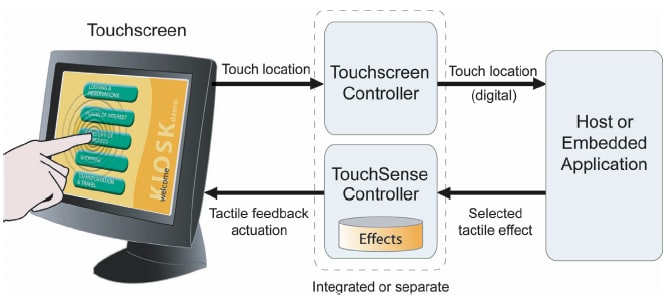
To provide tactile feedback, the system components may vary, depending on the mass of the touch-input device, but the basic architecture is the same, allowing high-speed control over an actuator. When the user presses a graphical button, the haptic feedback system drives the actuator according to a preprogrammed tactile effect. The actuator’s vibrations supply the perception that the graphical button moves, seeming to press and release as if it were mechanical. Because of the high speed and small displacement of the touch-input device, haptic feedback does not interfere with the visual qualities of the display.
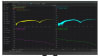
The processor load to support a haptics system today is trivial. Touch-input technologies are virtual commodities, and actuator solutions are available off the shelf. A common initial assumption about haptic technology for touch-activated controls is that, to be effective, the full motion of a button or switch has to be replicated. However, the human finger is not that discriminating. Thousands of hours of research have revealed that neurons in the human finger detect very small amounts of motion... if combined with moderate acceleration. Just 0.1 mm of motion, combined with an acceleration of at least 1.5 gee, supplies a sensation perceived as a confirming response. The low threshold of 1.5 gee of acceleration, however, does not necessarily produce the best tactile feedback. A more effective result is created by generating an acceleration and displacement profile that induces a stronger stimulus. These acceleration and displacement profiles can be visualized through “phase portraits”. Phase portraits can be generated after successful electromechanical integration of haptic technology into a touch interface device.
Tactile vibrations or “effects” can be synchronized with sound and display changes, creating a more engaging, multisensory experience. A wide range of tactile effects is possible, from those that reproduce the press and push-away characteristics of various mechanical switches to complex nonlinear vibrations. By varying the frequency, waveform, amplitude, and duration of the effect, the response can be changed to support various user interface features:
- A brief and subtle tactile effect can be used to help the user find their location on the keypad, similar in purpose to the small bump on a phone’s ‘5’ button and the J and F keys on a standard keyboard.
- Often-used function buttons (for example, Enter, Start, Back, Next) could have a unique feel, which provides unmistakable confirmation and also helps alert the user when they unintentionally press a button.
- Controls like fast forward and reverse could provide a subtle vibration that increases or decreases according to speed.
- Scrolling through lists could be accompanied by a ticking or detent sensation as each entry is passed, giving the user more sense of control.
Flexible and Efficient Integration
In theory, the technology could be applied to any size touch-input device, but the company’s current solutions work for screens and panels with diagonal measurements of around 2.5 to 36.0 inches.
System architecture includes (1) control software, installed on a dedicated or already-existing microprocessor or on an Immersion-supplied control board, (2) actuator(s), either an off-the-shelf eccentric rotating mass (ERM) or an Immersion-designed device(s), (3) a tactile effects library, and (4) an API for calling tactile effects from the host application.
Immersion offers a selection of three TouchSense integration kits designed to allow rapid prototyping across a range of touch-input device sizes. The kits include actuator samples; control boards with software installed; reference schematics; mechanical and electrical integration guidelines; and an SDK.
Control Software
If a circuit board is preferred, two types are available, for either RS-232 or USB communication. If the embedded approach works best, the TouchSense runtime executable would be provided.
Actuation
Correlating actuator size and type to touch-input device size is based on mass, mounting methods, cost, space, power, and type of tactile effects. However, as a very rough rule of thumb, touch-input devices over 9 or 10 inches will probably need an Immersion lateral actuator. Touch-input devices less than 6 inches will probably use an ERM inertial actuator. In the 7-9-inch range, the choice might go either way.
Tactile Effects Library
The tactile effects library includes a variety of effects so controls can be clearly distinguished and products differentiated. The haptics system gives designers a convenient method for experiencing effects, then selecting the ones that would be the most appropriate for the application and including them in the user interface design. The library was developed through consideration of human touch physiology and waveform design and is optimized for common usage scenarios.
API
The TouchSense API is used to call the tactile effects from the host application. The TouchSense software development kit includes several programming options, including a Windows ActiveX control, a cross-platform API in source code form, and communications support for custom interfaces. Sample code and a full description of the process of adding tactile feedback to the host application is also included.
Time and Cost of Design
All TouchSense kits include clear guidelines for the full integration process. In addition, Immersion often works with integrators to support faster prototyping and a high-quality design. The company has been developing and implementing its tactile feedback technology for over 15 years and has developed significant expertise in understanding the hardware requirements and how to adjust the elements to achieve the best possible results. Integrators usually complete hardware and software prototyping in a week or less.
The system has been successfully integrated into many product designs, and millions of devices incorporating the technology have been shipped throughout Asia, Europe, and the U.S. Cost-effective implementations are possible for products ranging from small, high-volume personal navigation devices to larger, low-volume kiosks.
This article was written by Steve Kingsley-Jones, Director of Product Management for Immersions’s Touch Interface Products Group (San Jose, CA). For more information, contact Mr. Kingsley-Jones at